
Domain Name Analyzer Desktop User Guide
Marketplace API Preferences
What Marketplace API Preferences Control
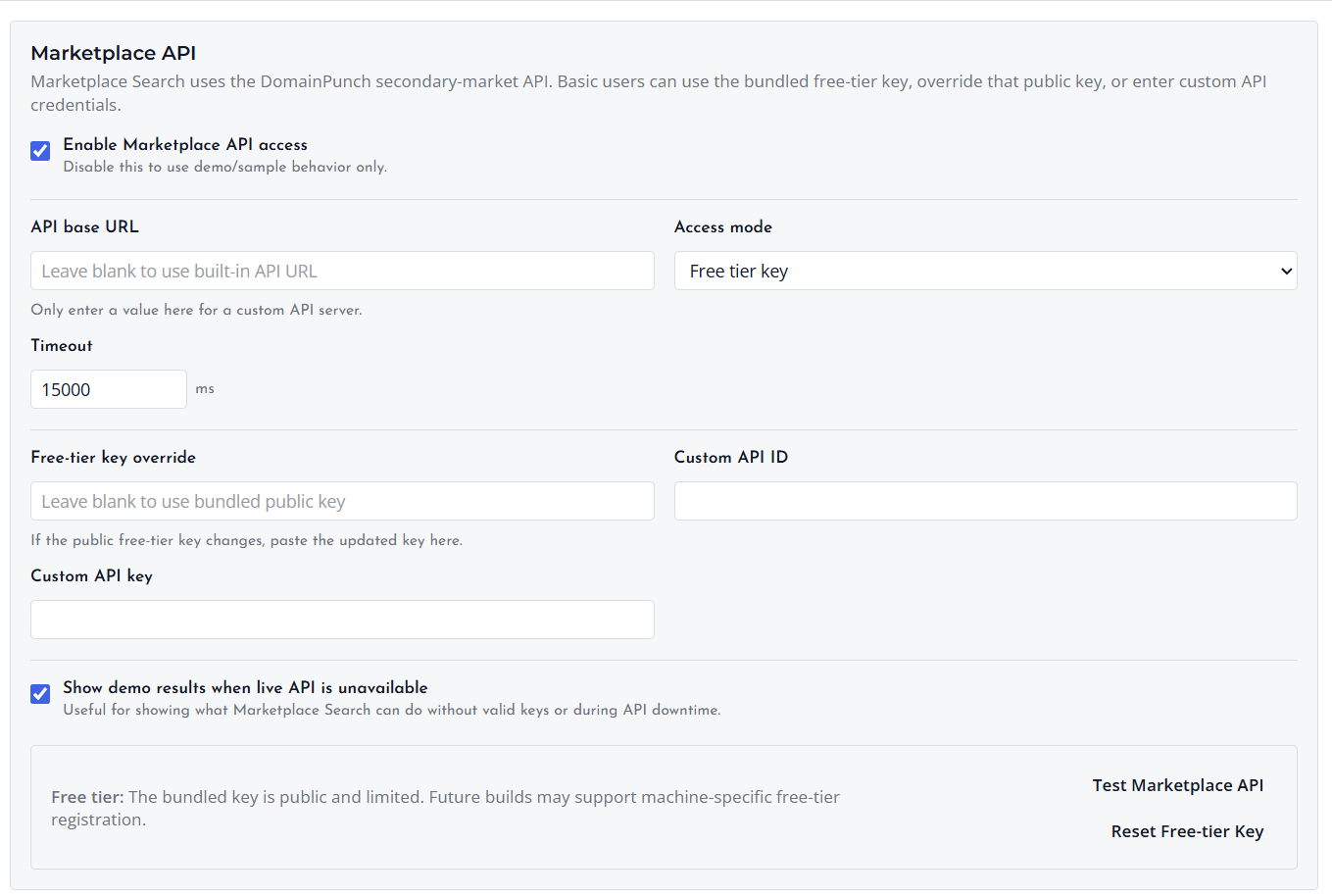
Marketplace API preferences control how Marketplace Search connects to the DomainPunch secondary-market API. Basic users can use the bundled free-tier access, override the public free-tier key when instructed by support, or enter custom API credentials when available.
Enable Marketplace API Access
Keep Marketplace API access enabled when you want Marketplace Search to contact the live API. Disable it when you only want demo or sample behavior.
API Base URL
Leave the API base URL blank for normal use so Domain Name Analyzer Desktop uses the built-in API URL. Enter a value only when you have been given a custom API server.
Access Mode
Use Free tier key for the bundled public key, Custom API ID plus API key for your own credentials, or Demo only / disabled when you do not want to use live API access.
Demo Results
The demo results option can show sample Marketplace Search behavior when the live API is unavailable or when valid credentials are not configured. Demo results are for interface review and should not be treated as live listings.
Testing the Connection
Use Test Marketplace API after changing marketplace settings. The test confirms whether the app can reach the configured marketplace service and may show the access tier returned by the service.
